
Calendar
 Last updated on April 9, 2026
A calendar visualizes a range of dates in one or more grids, and enables the user to select a date.
On this page:
How to use this component
The calendar component visualizes a range of dates, and enables the user to select a date.
Calendar components are commonly used:
- As part of a date picker (for example, in a scheduling interface)
- As a filtering option (for example, in search interfaces)
Calendar is an input component. It is not intended for content display.
Note: a separate RangeCalendar variant is planned for a future release.
Structure
- Solid border
- Decrement button
- Increment button
- Displayed month and year
- Days of week
- Selectable dates
- Currently-selected date
- Non-selectable dates
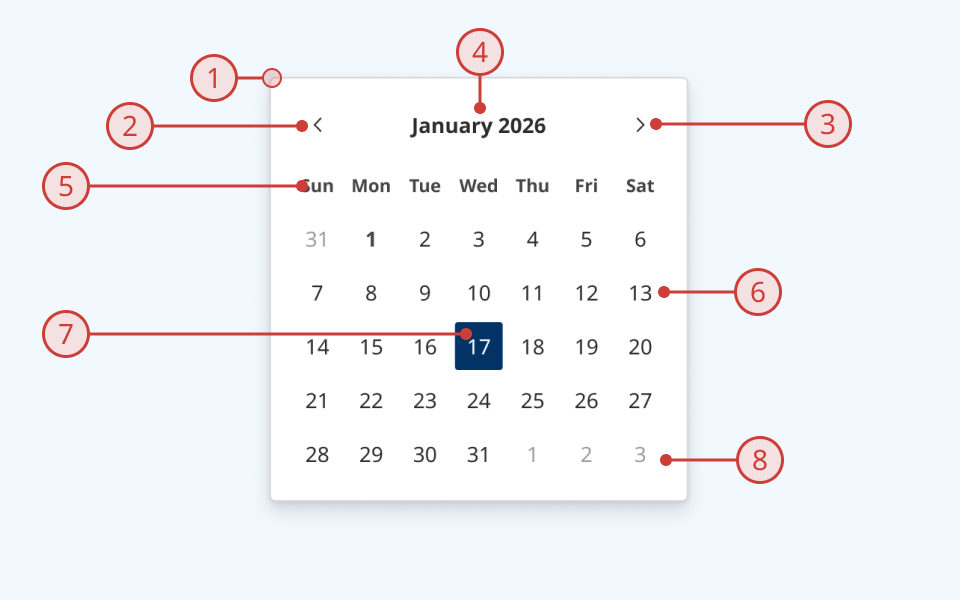
Design guidance
Design system components are published in a Figma library. Install the library and add it to your project to start using this component.
The calendar component can be configured to display one or more grids, each representing a single month. Increment and decrement buttons enable the user to navigate forwards and backwards.
For most usages, we recommend the default (single-month) behaviour. Avoid displaying more than 3 months at a time. Rendering more than 3 calendar grids may add excessive cognitive load for the user and make your UI unwieldy.
There are two ways to constrain the dates that are displayed:
- Minimum/maximum:
- Dates outside this range are greyed out in the calendar grid to visually indicate that they are not selectable
- Months that fall entirely outside this range will not be rendered at all
- Available/unavailable:
- This can be set programmatically (for example, to limit selections to weekdays)
- Unavailable dates will be displayed in the grid, but are not selectable
- Unavailable dates are coloured and struck through to visually indicate that they are not selectable
Controls
| Control | Options | Description |
|---|---|---|
| Visible months |
|
How many grids (each representing a single month) are rendered |
Technical information
Detailed technical documentation, interactive previews and code samples are published in the B.C. Design System Storybook.
A reference implementation of the calendar component in React is published in the React components library. Install the package via npm to start using the component.
Events and props
The checkbox group component is a styled version of the React Aria Calendar. It uses objects from the @internationalized/date package to format date values.
Refer to the React Aria documentation to understand its structure and API.
Accessibility
These summaries reflect the component used as provided. If you modify it, confirm that your changes comply with the Web Content Accessibility Guidelines (WCAG). B.C. government digital services are required to meet the WCAG Level AA standard.
| Requirement | WCAG Success Criterion | Validation |
|---|---|---|
| Make sure visual formatting is represented in the backend code | 1.3.1 (Level A) |
Label and input field are automatically associated via an aria-labelledby attribute |
| Make websites keyboard accessible | 2.1.1 (Level A) |
Calendar is focusable and fully operable using only the keyboard, with visual indicators for focused/selected elements |
| Prevent keyboard navigation traps | 2.1.2 (Level A) |
When in focus, the user can exit the calendar by pressing the 'Tab' key |
| Show where the keyboard is active on the screen | 2.4.7 (Level AA) |
Focus is indicated with a visible and offset secondary border around increment/decrement buttons and individual date cells |
| Make sure interaction or click targets meet a minimum size | 2.5.8 (Level AA) |
All interactive elements have a minimum target size of 24px by 24px |
| Ensure user interface components behave predictably | 3.2.1 (Level A) |
Input value does not change and is not submitted on focus |
| Make sure components can be read and used by assistive technology | 4.1.2 (Level A) |
The calendar is automatically labelled by an aria-label attribute, and has the application role |