
BC Parks annual visitor report
 Last updated on January 14, 2026
Park use permittees who are required to complete an annual visitor report can submit it through an online platform.
In order to complete the annual visitor report form, you will require a Basic or Business BCeID login. Using your BCeID login allows you to save the form and return later to update it.
How to submit an annual visitor report
Click on the form link and enter your Basic or Business BCeID username and password:
All fields in the form with an asterisk must be completed.
Park details section
'# of Days' will auto-populate when you enter the date range
'# of Client Days' will auto-populate once the number of days and number of client days have been entered
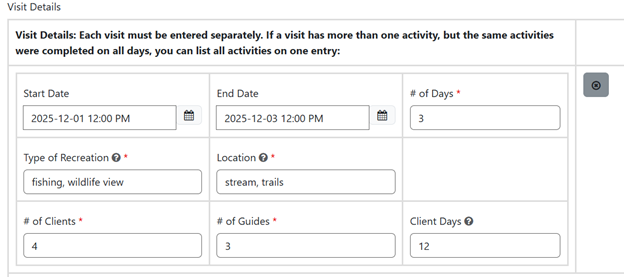
Each visit must be entered separately. If a visit has more than one activity, but the same activities were completed on all days, you can list all activities on one entry. In the following example, 12 client days for each of 2 activities totals 24 client days:
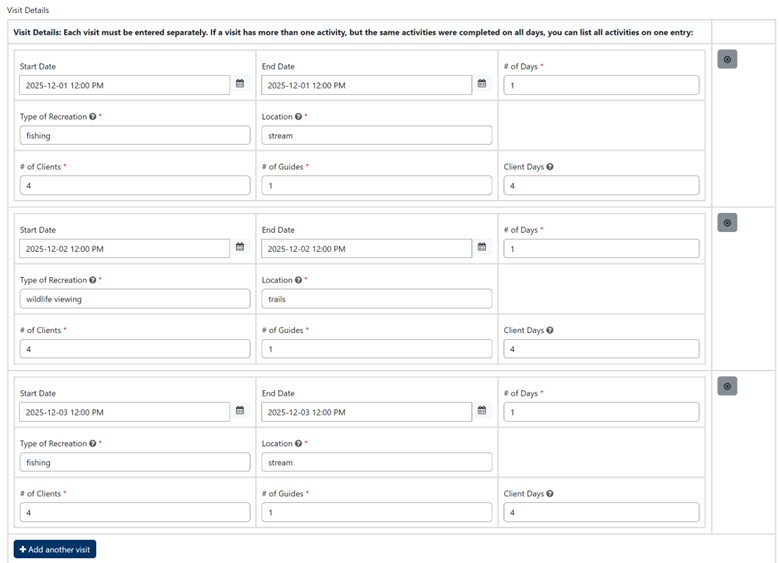
If the same period has different activities on different days, those need to be listed separately. In the following example, 4 client days for each of 3 activities totals 12 client days:
Save a draft
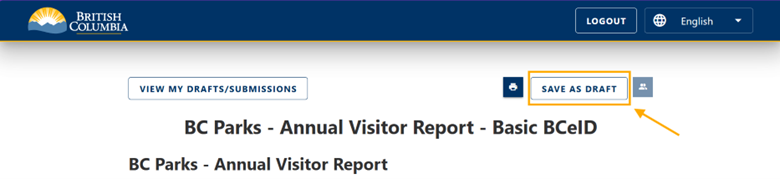
You can save a draft of the report if you need to add additional entries later.
Declaration section
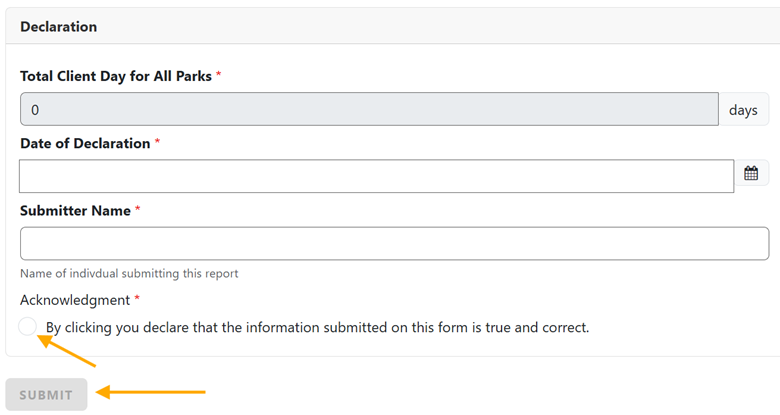
In the 'Declarations' section, the 'Total Client days for all Parks' will auto-populate based on the entries made in the 'Park Details' section
Click the 'Acknowledgement' radio button to declare the information submitted is true and correct
Once all visits have been entered, click on 'Submit' to complete your submission
Preview the report
You can preview the report before you click the 'Submit' button. Any fields that are incomplete will be highlighted in red.
