
This is a Phishing Exercise
 Last updated on September 28, 2026
Fear not – nothing has happened to your device and no action is required.
The B.C. Public Service wants to help you and your colleagues be prepared should a real phish arrive. You will momentarily receive a brief training module from Microsoft in your email from notification@attacksimulationtraining.com
If you would like to reach out to us directly, email M365.Security@gov.bc.ca
If you would like to help us by providing feedback and comment, please take our Phishing Survey
Learn more about the B.C. Public Service Phishing and Education program below.
Nobody likes getting phished, whether it’s for real, or as part of a training exercise like this – but it can happen to anyone, which is why it’s important to be prepared.
Learn more about spotting phishing emails below.
How could you have identified this phishing email?
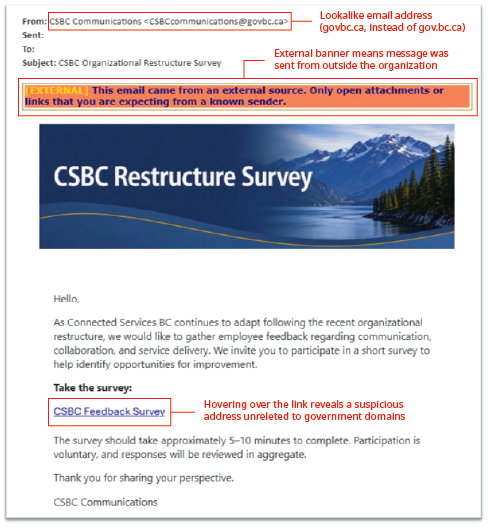
- The sender email address is suspicious.
- CSBCcommunications@govbc.ca is not an official government email domain. The "govbc.ca" domain is typosquatted to appear similar to the real "gov.bc.ca" domain.
- The email is coming from an external source.
- Be wary of emails that from external sources.
- Hovering over the link reveals that it leads to a suspicious URL.
- Although email filtering systems do a good job of blocking a lot of malicious emails and links, some can still get through. If you see that the link redirects you to an odd URL do not click on the link.
- Bad actors will also use URL shorteners such as Bitly or TinyURL to mask the malicious site they are redirecting to.
Why is the B.C. Public Service sending out these emails?
- Phishing attacks have become more sophisticated over time. Despite best efforts of digital security, some of these phishes still land in employee inboxes.
- Fortunately, evidence shows that exposure to practice phishing emails can help people to protect themselves and others from losses when faced with real phishing attacks by increasing awareness of the techniques that cyber criminals use.
What do I need to do?
- Falling for a phishing attack can happen to anyone. Nothing has happened to your device and you cannot be identified. You are not required to contact anyone or to report this to your supervisor or CSBC Security.
- Right after clicking on the link that sent you to this page, you will receive a brief training module from Microsoft. We encourage you to complete it.
What should I do if I receive a phish?
All B.C. Government employees are reminded to never interact with suspicious emails. If you receive a spam/phishing email, remember the following:
Never respond to spam/phishing emails.
(NEW) Outlook 365 users - use the report message feature and choose either report phish or report junk.
-
From your inbox, select a suspicious email message you want to report.
From the Outlook Home ribbon, select the “Report Message” dropdown arrow to see your options: -

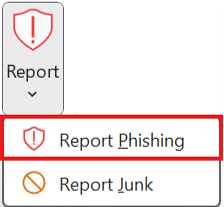
For more information on this new function, read the Service Bulletin on Outlooks 'Report Messaging' feature.
How can I be better prepared in the future?
- The B.C. Public Service wants to raise the cyber-security bar across B.C. You can help!


Analyze before you click
- Review the email address and any links, and avoid downloading unnecessary or unexpected files

Learn more
- Complete trainings through the Learning Centre, such as IM-117.
- Visit our Cyber Threats page